Today I googled for around an hour to find a solution from which I can get the structure of a database table in my (.net) datatable object. Frustrated, dejected ; I closed the browser window and started doing something as the work was urgent and a work around was highly required. After using my own brain for few minutes I got it and it was so simple (a query… Select * from table_name where 1=0) which made me think whether google is necessary on the next moment when I get into a problem.
Saturday, May 20, 2006
Delay Google


Saturday, May 13, 2006
About MS Visual Studio 2005 Editor for ASP .net
I get excited when I start my Visual Studio to write any web application because of its kind nature of suggesting the code (oh ya!! It’s ‘intellisense’). But the shit about this editor is when I change table height/width parameters (in design view) it changes in pixels not in %. This is really irritating me because only a wrong mouse click (in design view) in my complex web pages changes width and height parameters of al s. So again I’ve to go to each and every of my table and change the parameter. Although this editor is much batter then the one which was coming in VS 2003 (for ASP .net) as that one was starting in grid mode by default. Editor for ASP .net in VS 2005 doesn’t change my HTML formatting and I am really indebted to Microsoft as it was not there in editor of VS 2003.
Thursday, April 20, 2006
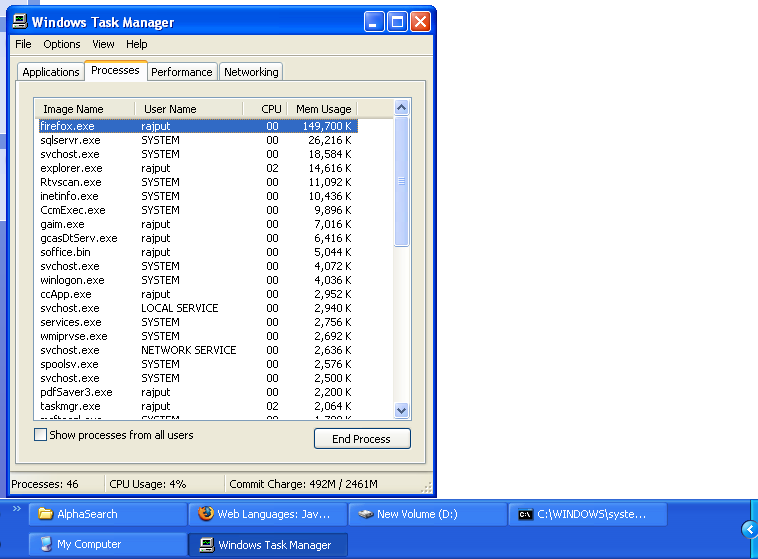
When does the firefox put the machine on fire?
Q. When does the firefox put the machine on fire?
Ans: Just analyze the attachment.
Monday, April 10, 2006
Ye, Yes, Pee . NET 2
From this week I am starting work on ASP .net 2, a year after first hands on exp (read my blog of 1st march 2005). Webcasts from Microsoft are giving great promises but it’s my time to see whether it was an advertising program or they really those are for us. Some of cool new features (or features with newness) according to me are masterpages, menu, sitemap, cashing, RAD and most importantly XHTML W3C standards compatibility for cross browser support (MS now understands that not following standards may keep MS following only). VS 2005 and MS SQL 2005 are also yet to experience. And as I have to work on
The list is not long but time is really ticking fast!
Friday, March 17, 2006
Google is reached to the Mars
How about URL http://www.google.com/mars !! Don't laugh and just click on it. Google knows the future. Days are not far when you will like to spot a location on mars to have party for next weekends. It's just matter of 50 years ;)
Tuesday, February 28, 2006
µTorrent - another slick baby
µTorrent is very very light weight bit-torrent client. It's amazing for poor peoples like me, who don't have much money to buy enough RAM. Installer is 130 KB and the application takes only 5-8 MB in my RAM. It's all those features which an advanced bit-torrent client should have. So, I kicked Azureus out (takes 30-60 MB RAM) and µTorrent is in.
Get it from here.
Slickrun, slick one is faster
Slick run is a tiny software which provides slick “run” bar from where you can execute your commands. It's a floating command line utility i.e. Application launcher. Many useful commands come with the software but surely you will also add your own and that makes is different then [Windows Key + R]. It has auto complete facility and this bar can be put anywhere on the screen. It's ghost effect will never let you know about it's existence until you want to use it. If you are using Start -> Run very often then definitely you will love slick run.
It's here.
 This is it... Really slick na ? This is it... Really slick na ? |
Sunday, February 19, 2006
Tell me - Is AJAX cool or hot?
Feeling to write someting on some cool technology to slay off my drowsiness. So I choose AJAX. When I started using Gmail, I was surprised by its quick response. Specially, it was noticeable that on most of the events, it don't load full page (like Yahoo!! is still doing). This is due to new idea of AJAX technology. AJAX is new 'idea' but not new technology, as it uses our old babies 'Java script' and 'XML'. Whenever the web page needs some data, you get it using Java Scrip in XML format. As AJAX is simply use of Java Script and XML in smart way, you can develop such interface in any web development languages (like ASP, JSP, PHP... and many). You can have application like interface and speed with AJAX. I have read somewhere that 'limitations of AJAX totally depends upon the imagination of the developer' – and that may be right. If you want to see sample application, goto (again... I am a bad programmer) google suggest and google maps (common... don't except link from me). A good tutorial is here.
I leave you here and myself too.
Sunday, January 22, 2006
My Penguin wants IPod nano to play with
Linux lover please stay calm... see there are people around you. Don't shout and just read.

Yes... your guess is correct. Your IPod can boot the Linux. You see, Linux can boot anywhere and it's uCLinux this time. You can have an dual boot IPod with second boot option as the uCLinux. People have done this successfully and now playing with this. Even you can take that line literally, as you can play games.. yes games... in your IPod nano. As once you have Linux somewhere it's over. GUI is provided by podzilla. There are many customized builds exists for that. For more information, goto (sorry, I am a bad programmer) iPodLinux site: http://ipodlinux.org/
These are the tasks which you can perform with your IPod.
You can play MP3, OGG, AAC (for which you have the one)
MultiConvert - A program to convert any unit of any type to all other units of that type in "real time"
Periodic Table - Periodic Table for the iPod
viP - Text Editor
aalib - Portable ASCII art graphics library
Python - Write Python programs on your iPod
Ncurses - Write ncurses programs on your iPod
Wikipedia - Carry the whole WikiPedia around on your iPod
Hell lots of games.
- Play video... No need to pay extra bucks.. just wait for some more time to mature this tech.
You will never get screwed by doing this as you can always restore your iPod firmware again. Try this today if you have the one. And donate me Rs 14000 if you want me to do so :D
Take my words, one day, some Linux will boot in mind.
Thursday, December 01, 2005
Indigo
The Dot NET Framework is focused on unifying all Microsoft application development. It's primary tenets include platform independence and network transparency. Dot NET is Microsoft's strategic initiative for server and desktop development for the next decade. We are now approaching Longhorn era with key products like BizTalk Server, Indigo, MapPoint, Microsoft Business Solutions, SharePoint, SQL Server, Visual Studio, Web Services Enhancements (WSE) and Windows Server 2003. Indigo is one of the biggest steps toward this goal as it provides facility of Communication between all these which is most important thing behind the whole idea.
Recently I attended a Microsoft's MSDN meet at Chennai and got some idea about this great technology- “Windows Communication Foundation – Indigo Architecture”.
I have read some descriptions about Indigo but the one written below is, I think, OK.
“Indigo is a unified programming model that enables developers to build connected systems in a productive manner.”
The most beautiful thing about Indigo is that it allows you to publish your services as ASMX, WSE or .Net Remoting... whatever you like. I mean while coding you need not to worry about the publishing aspect of the application. Learning API has considered more difficult than learning a new language. Now you don't have to look for learning WSE, ASMX, System.Messaging, System.EnterpriseServices, and .NET Remoting as Indigo will bring the best aspects of these together with single API, although with some limitations for COM+ (I don't know what exactly they are).
If you go into details about finding whether indigo is Service Oriented Architecture (SOA, more popularly) or Enterprise Service Bus (ESB or messaging middleware), you are putting yourself in the maze because it is both. You can use Indigo API as SOA as well as ESB. Indigo provides all those facility which should be provided by a basic ESB facility.
You can use this API if you have Microsoft Visual Studio 2005 beta 2 or later (I don't remember exact version of framework and SDK provided with that). Here you don't need IIS server or anything like that. HTTP listener will run on kernel mode and .net framework can use it to provide all those basic services provided by a web server (of course including XML-SOAP).
It seems Microsoft will gain good respect of geeks with this new “open standards” technologies. Dot Net technologies are getting recognized at all levels. Dot Net technologies are GNU DotNET and Mono Project are good example of it, plus all those language which has just got “.net” suffix.
With more advancements, Indigo will be really hot technology similar to idea of “synapse” of the movie “Antitrust”.
Some good links you can refer:
http://msdn.microsoft.com/webservices/indigo/default.aspx
http://www.ftponline.com/vsm/2005_03/magazine/departments/guestop/
http://itmanagement.webopedia.com/TERM/I/Indigo.html
http://www.internetnews.com/ec-news/article.php/3357621
Thursday, September 15, 2005
Google and Yahoo version of Sitemap
Google Sitemap
Google has announced sitemap program with “beta” tag. This
service is free and cool. With this service, you can list all of the
URLs of a web site for inclusion in the Google index. Just you have
to do is to create an XML file according to specification of Google
and put it on your site (Home directory is preferred location). Don’t
get afraid by the “XML” as you don’t have to create
a complex xml file. Sample xml is given below.
<urlset
xmlns="http://www.google.com/schemas/sitemap/0.84">
<url>
<loc>http://www.example.com/</loc>
<lastmod>2005-01-01</lastmod>
<changefreq>monthly</changefreq>
<priority>0.8</priority>
</url>
</urlset>
You
can add as many URLs as you want. Google also provides the status of
your submitted sitemap. You can even submit your sitemaps for web
pages that are designed for mobile devices.
It’s not long
time google has launched this service (nearly starting of this
summer) as “beta” but many tools are available in market
to generate the XML sitemap file automatically. Google Sitemap Gen is
such a tool which is free. Visit
http://goog-sitemapgen.sourceforge.net/ for more information. Go to http://www.google.com/webmasters/sitemaps/docs/en/about.html to know more about Gooooogle site map.
Yahoo version of sitemap
Yahoo!
has its own simplified version of a sitemap for crawling and
indexing. http://submit.search.yahoo.com/free/request. You can also
provide the location of a text file containing a list of URLs, one
URL per line, say urllist.txt. Compressed versions of sitemap are
also recognized (e.g. urllist.gz). Sites with crawlable urls may
benefit from using the multiple URL submission option at Yahoo rather
than the Search Submit paid inclusion.
It's important to note
that inclusion is not search engine optimization (SEO more
popularly). But it’s important when a part of your site in not
index. In this case it’s natural that you will generate more
traffic for your site.
visit my site at http://yogendrasinh.tripod.com

Wednesday, March 02, 2005
A seminar on ASP .net 2.0 ("Whidbey")
This is specially useful for those who missed the seminar on “Building Secure Web Applications using ASP.NET 2.0 ("Whidbey")” on Feb. 25, 2005 (by Anand M. see: http://www.microsoft.com/india/msdn/speakers.aspx#AnandM).
ASP.NET Whidbey is next version of ASP.NET (see: http://msdn.microsoft.com/asp.net/whidbey/default.aspx). Beta version of ASP.NET Whidbey is available for testing purpose. It's first release is expected in this September (so very near!!).
Basically Security as two aspects 1. Authentication and 2. Authorization. The speaker covered mainly the Authentication part with presentation and demos. The session started with some questions and difficulties the developers are getting while developing an ASP application. Major difficulties with the most of developers were writing too much code for security and support for cookies (A short line of text that a web site puts on your computer's hard drive when you access the web site) on mobile browsers. Microsoft is well known to provide solutions in which developers has to write minimum code and that also with great ease. Anand was cool as solution for both the problem was there in presentation (precisely, only that was there) ! I have described the overview of the presentation here.
At starting we came to know that in Visual Studio .net 2005 there is an integrated web server for debug purpose.
A web application need to perform many authentication. Main techniques are form authentication and role authentication. Role authentication is mainly useful for authorization activities in modern programs. Normally authentication information is stored in the cookies of the browser. But many browsers do not support cookies (mostly browsers on mobile devices). So ASP.NET provides four different type of facility for storing authentication information.
Device ID (default)
Cookies
Automatic
URI
Here automatic is buzz point. If you set “Automatic” then automatically it will select Cookies or URI or Device ID (written in priority order). Cookies and URI are more secure then device ID as device ID can be tampered. So if the browse is not supporting cookies then automatically URI will be selected which is still secure at some extend (If you don't hate the ugly URI on the address bar ;-) ). Anand has given demos to show all 4 possibilities.
Now let's come on second question, i.e. reducing number of code !! Defiantly the topic of anyone's interest...
Microsoft Visual Studio .net 2005 is providing a control to authenticate the user. Just drag and drop the control on you design screen and you have done most of the work !! You can make GUI of the box of your choice by changing the parameters.
Now mention the database in which database provider's address which stores the address of database and column name for database and password. A sample database table is automatically created which has facility to store login and password information + registration details + roles information details and rest all necessary information. And you have done !
To add/update/delete information about roles, there is admin tool or MMC with GUI. You can edit .config file manually or programmatic way. You can write code to show content according to the role that user belongs to.
For registration, change password and rest of common things for authentication information maintenance.
He did this all there only.. yes.. in 2 hour seminar !
This controls give many advantage over traditional system of writing the whole code at our own. First thing is code is not just reduced... it's now redundant. Second thing is security issues (like SQL injections and all) are handled automatically as code is written by Microsoft ;) .
Now let's talk about database supported by it's first version. You can guess easily (and for obvious reason)... they MS Access and MS SQL server. We were advised to use MS Access just for debugging purpose. And for real application MS SQL.
If you want to experiment this technology then download it from Microsoft's web site. It's available as a beta release and free of cost for testing purpose.
---
After many yeas I sat on the first row. We got a November-December MSDN india magazine. We got a good coffee and evening snack apart from the knowledge that I have described. And of course a new experience!!
This is my first blog. Comments are invited. Visit my web site. http://www.rajput-yh.tk
Subscribe to:
Posts (Atom)


